
I Just Wanted to Drive the Nürburgring
I bought Forza Motorsport for one simple reason: to choose a car and drive the Nürburgring Nordschleife. On Linux, reaching the track became an Xbox Gaming Services, Wine, and Xodus engineering project.
Last updated on
I bought the current Forza Motorsport for one simple reason: I wanted to drive the Nürburgring.
The plan was as small as it sounds. Pick a car, load the 20.8-kilometre Nordschleife, and spend an evening learning the lap. I was not chasing a benchmark, a compatibility experiment, or a new Linux project. I just wanted to drive.
Part of that pull came from the years between 2011 and 2014, when my cousin and I played Forza Motorsport 4 on an Xbox 360 Slim. He was my cousin by definition, but in that part of my life he felt much more like a brother.
I do not remember every car we chose or every race we finished. The details blurred; the ritual did not. Choose a car, share a track, and start another race. Buying the new Forza was a way to return to that feeling through one concrete place.
The Steam page had other plans for me.
Forza Motorsport is a Windows game, but that alone is no longer unusual on Linux. Most of my library runs through Proton with very little ceremony: install the game, select a recent Proton build if Steam does not choose one automatically, and play.
What appeared after I pressed Play was not a car selector or the Nürburgring. Forza reached its splash screen, opened a Gaming Services repair tool, and quit. The game’s Proton compatibility report had been open since October 2023, and for most of its life the conclusion was effectively: this does not work.
Then, in August 2026, a real path appeared. A custom Proton build, an experimental Xbox service bridge, one Microsoft DLL from a Windows installation, and a Unix socket passed through Steam’s container got the game online. Forza then ignored my controller. Once I fixed that, it decided my NVMe SSD was a hard drive and showed error AP702.
By the time the Nordschleife finally loaded, a plan to spend an evening driving had become a tour through nearly every layer between a physical controller and an Xbox-connected Windows game. This is the stack I ended up with on Arch Linux — what Forza showed at each stage, what the community breakthrough solved, what I had to diagnose myself, how Invite and Join finally worked, and why incoming Xbox notifications are still a separate unsolved problem.
This article is the debugging story. The current source, guided setup, exact revisions, rollback instructions, and dated evidence live in the public Forza Motorsport Linux project. Start with its README rather than copying commands out of the narrative below.
This article describes the exact legacy-v0.1 setup live-verified on September 2, 2026, using the GE-Proton11-3-FM build published on August 4. Xodus and the Wine patches involved are experimental. The v0.1.0 release records the evidence boundary; it is not a general compatibility promise.
What Appeared Instead of the Nürburgring
The relevant parts of my system were:
| Component | My setup |
|---|---|
| Distribution | Arch Linux |
| Desktop | Hyprland with KDE/Plasma services |
| GPU | NVIDIA GeForce RTX 4080 SUPER |
| Controller | Wired Xbox Series controller, USB 045e:0b12 |
| Game | Forza Motorsport, Steam AppID 2440510 |
| Compatibility tool | GE-Proton11-3-FM |
The first failure happened before I could choose a car or a circuit. Forza launched its bundled Gaming Services repair tool, found no Windows Gaming Services installation, and quit.
That distinction matters. This was not a missing Visual C++ runtime, a bad Vulkan driver, or a launch option that ordinary Proton could paper over. The game expected an Xbox/GDK service that did not exist in the prefix.
The Community Breakthrough
The turning point was AllanVester’s August 2026 guide in the Proton issue. It combines three pieces:
- A dedicated
GE-Proton11-3-FMbuild with Forza-specific Wine/GDK work. - A
forza-onlineXodus branch that supplies the Xbox identity and token service the game expects. - Microsoft’s
xgameruntime.dll, copied from a Windows installation and stored asxgameruntime.dll.threading.
This is not a normal GE-Proton release. ProtonUp-Qt remains how I prefer to manage ordinary compatibility tools, but this one-off fork is not one of its standard providers. I installed it manually into Steam’s per-user compatibility-tool directory instead of replacing any system Wine or Valve Proton files:
cd ~/Downloads
sha512sum -c GE-Proton11-3-FM.sha512sum

mkdir -p ~/.local/share/Steam/compatibilitytools.d
tar -xzf GE-Proton11-3-FM.tar.gz \
  -C ~/.local/share/Steam/compatibilitytools.d
After restarting Steam, I selected GE-Proton11-3-FM under:
Forza Motorsport → Properties → CompatibilityKeeping the fork isolated turned out to be important. The controller and storage fixes later in this article modify Wine binaries. I wanted those changes scoped to one game, not silently inherited by everything I run through Proton.
The XThreading DLL
The custom runtime still delegates one GDK component, XThreading, to Microsoft’s implementation. The guide requires xgameruntime.dll from a Windows installation to be copied into the Forza prefix under a different name:
steamapps/compatdata/2440510/pfx/drive_c/windows/system32/
└── xgameruntime.dll.threading
I copied this from my own Windows installation. I am deliberately not redistributing it: it is Microsoft’s binary, not part of Wine or Xodus.
Without that file, this particular custom build does not launch the game.
Replacing Gaming Services with Xodus
Xodus is an unofficial project working toward Xbox PC game support outside Windows. Its service exposes xodus.sock; the custom GDK runtime talks to that socket when Forza asks for Xbox credentials and title-specific tokens.
I built the forza-online branch locally. On Arch, the relevant build and login dependencies were already mostly present on my machine; the explicit set is:
sudo pacman -S --needed base-devel rust protobuf webkit2gtk-4.1

git clone --branch forza-online --single-branch \
  https://github.com/AllanVester/xodus.git
cd xodus
cargo build --release --workspace

install -Dm755 target/release/xodus-cli \
  ~/.local/libexec/xodus-forza/xodus-cli
install -Dm755 target/release/xodus-service \
  ~/.local/libexec/xodus-forza/xodus-service
The login is interactive and only needs to be completed once:
WEBKIT_DISABLE_DMABUF_RENDERER=1 \
  ~/.local/libexec/xodus-forza/xodus-cli login
The environment variable worked around WebKit rendering trouble on my Wayland/NVIDIA session. It is not required on every machine.
Why KWallet, Not GNOME Keyring
Xodus stores its proof key through the Linux Secret Service API. Its secret-storage implementation uses a D-Bus Secret Service backend; it does not require GNOME Keyring specifically.
On Plasma 6, KDE’s ksecretd provides org.freedesktop.secrets. The ArchWiki KWallet page documents the same compatibility layer. Installing a second keyring daemon would have given two applications the ability to compete for the same D-Bus name, while adding no capability I was missing.
I verified the actual owner instead of guessing from package names:
busctl --user status org.freedesktop.secretsOn my session, the result pointed to:
Comm=ksecretd
Exe=/usr/bin/ksecretd
So the right answer for this KDE-based system was simple: keep KWallet, keep libsecret, and do not install gnome-keyring.
The Reboot That Broke the Launcher
That conclusion was correct, but my first setup still depended on ksecretd already being alive. A reboot exposed the gap. Steam started the Forza wrapper, the wrapper started Xodus, and Xodus immediately crashed while initializing its keychain:
Failed to init keychain: org.freedesktop.DBus.Error.ServiceUnknownNothing had happened to Forza, Proton, or the Xbox credentials. SDDM had created a dormant ksecretd --pam-login process and a PAM handoff socket, but Hyprland had not run /usr/lib/pam_kwallet_init. The daemon was waiting for the login environment and did not yet own org.freedesktop.secrets.
The right fix was not another keyring and not a permanently enabled Xodus service. The Forza launcher now completes the existing KDE Wallet PAM handoff before Xodus asks for its proof key.
Running Xodus Only While Forza Runs
The original guide says to start xodus-service and leave it running while playing. That works, but I did not want an experimental Xbox bridge running for the entire desktop session.
The first wrapper I wrote was short: start the user service, wait for xodus.sock, run Steam’s command, and stop the service afterward. It proved the lifecycle, but it also exposed awkward ownership questions. What happens if Xodus was already running? What if two launchers race? What if the service starts but the expected socket belongs to something else? A friendly wrapper that stops another process’s service is not friendly at all.
The published launcher therefore uses a one-shot ownership token. The systemd unit atomically consumes that reservation before it starts; the launcher verifies the socket and service invocation it owns; cleanup stops only that invocation. A direct manual service start has no reservation and fails closed. A pre-existing Xodus instance is left alone. The full protocol and threat boundary are documented in the project’s architecture.
The user unit remains intentionally disabled. The guided setup installs it without enabling it, and the Steam launcher owns its per-game lifetime.
I tested that lifecycle separately: inactive before launch, active with a real socket while Forza was running, then inactive with the socket and ownership token removed after exit. I repeated the test after a reboot. The launcher completed the KWallet handoff, ksecretd acquired org.freedesktop.secrets, and Forza reached a mapped game window without a keychain panic.
ksecretd remains available because it is the desktop’s shared KDE credential provider. The experimental Xbox bridge does not: Xodus exists only for the game session that requested it.
Getting the Socket into Steam’s Container
Steam launches Proton games inside pressure-vessel, where a host socket is not automatically visible. The launch options therefore need PRESSURE_VESSEL_FILESYSTEMS_RW for the current user’s xodus.sock. Hard-coding my UID or launcher path in a public article would make the example subtly wrong for someone else, so the project generates the exact line instead:
./setup steam-optionsBefore adding it, Forza reached the menu but reported:
NOT CONNECTED
Reason: Failed to download content
After exposing the socket, the game signed in, downloaded content, populated the Message Center, and showed current online gifts. That was much stronger evidence than merely reaching the title screen.
The Controller That Worked Everywhere Except Forza
The next failure was absurdly specific.
My wired Xbox Series controller worked in Linux. Steam saw it. Steam Overlay accepted its buttons. Wine’s controller panel showed it under XInput and Windows.Gaming.Input, with live axes and buttons. Other games worked normally.
Forza showed only the keyboard.
I tried the obvious combinations:
- Steam Input enabled and disabled
- the controller unplugged and reconnected after launch
PROTON_DISABLE_HIDRAW=1, which had already helped another user in the Proton issue- the physical keyboard disconnected, just to remove any chance of input-priority confusion
None of those made the controller appear in Forza.
The useful observation was that Steam Overlay still handled the gamepad while the game ignored it. The Linux device path and Steam mapping were alive. The failure was inside the Windows input layer seen by Forza.
Tracing Windows.Gaming.Input
With Wine input tracing enabled, the controller was clearly enumerated:
device_path "...hid#vid_045e&pid_0b12&xi_00..."
wine_provider_get_NonRoamableId ... stub!
The source explained the mismatch. In this Forza Wine branch, wine_provider_get_NonRoamableId only constructs an ID inside a special case for Valve’s virtual Steam Input device, 28de:11ff. Every other vendor/product pair falls through to E_NOTIMPL.
My physical controller was 045e:0b12. It was fully readable, but Forza’s WGI path could not obtain the stable identity it expected, so the game discarded it.
I patched the 64-bit windows.gaming.input.dll in the dedicated Proton build so the existing XInput-device path also ran for the physical controller. The corresponding source change is now public as the wgi-physical-nonroamable-id branch and a draft Wine PR. For the exact release I used, the initial diagnostic binary patch was four changed bytes:
| Item | Value |
|---|---|
| Original SHA-256 | 57538166ba052dc763232880f18a4b48a07ab735a61b5b8fbf5a8f56a05f2ca5 |
| Patched SHA-256 | f520d9b4d44d9cdc11e67396583a1ccc8c53eca60e0b3a69233f358556b59245 |
| Offsets | 0x14932, 0x1493a |
| Change | two conditional jumps replaced by two-byte NOP pairs |
Those offsets identify instructions in one exact DLL build. A future release can move or rewrite the function while keeping the same filename. I kept the original DLL, checked its SHA-256 before touching it, patched only the dedicated Forza Proton, and disassembled the result before launching the game.
With Steam Input disabled for the game and that WGI identity path patched, the controller finally appeared in Forza. Buttons, sticks, menu navigation, and racing input all worked. PROTON_DISABLE_HIDRAW=1 had been useful as a diagnostic experiment, but it was not part of the final fix and is not in my current launch options.
AP702: My SSD Became an HDD
At that point the game was online and the controller worked. On the next launch, Forza displayed another warning:
Hard drive type (HDD) does not meet requirements (SSD) (Code: AP702) 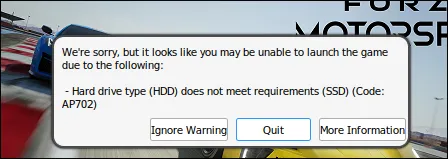
The game was installed on Btrfs mounted with ssd,discard=async. There was no hard drive in this path.
The warning had an Ignore Warning button, but I wanted to understand why the hardware check was wrong. I first tested -SkipTargetHardwareProfiler, a string present in the executable. The flag arrived in the process command line exactly as requested and AP702 still appeared. That proved it was the wrong switch rather than a Steam quoting problem.
The storage trace contained the real clue:
fixme:mountmgr:query_property Unsupported property 0x8Wine’s mountmgr.sys implementation handled StorageDeviceSeekPenaltyProperty, property 7, and then returned STATUS_NOT_SUPPORTED for unknown properties. Forza also asked for property 8: StorageDeviceTrimProperty.
Microsoft documents the corresponding DEVICE_TRIM_DESCRIPTOR as two size fields followed by TrimEnabled. Wine had no response, and Forza interpreted the missing information as an HDD.
There was no registry value or launch flag to enable. The behavior was absent from Wine.
I added a minimal response to the 64-bit mountmgr.sys used by the dedicated Proton and the copy already placed in the prefix. The source implementation is published as storage-trim-property with a draft RFC PR:
- property 7 still reports
IncursSeekPenalty = false; - property 8 now reports
TrimEnabled = true; - every other unsupported property is still rejected;
- short output buffers keep the existing header-only behavior.
For the exact binary:
| Item | Value |
|---|---|
| Original SHA-256 | 764f72bad9e639aead6535045f953815d9013ecb39b24b3b0027a70b846712b6 |
| Patched SHA-256 | 61fd9e9bb22ec1e92a3156c55cbfe77e22df49186b2de8f42b26d71cae2349d2 |
| Dispatch change | 0x6b3f, accept only properties 7 and 8 |
| Descriptor change | 0x6f84, set the boolean from the requested property |
The verification was deliberately two-sided:
- Before: Forza displayed AP702 and the log recorded
Unsupported property 0x8. - After: the same API request completed, that error disappeared, and Forza proceeded directly into the game.
The incorrect -SkipTargetHardwareProfiler option was then removed. Keeping flags that merely correlate with a successful launch is how Steam configurations become archaeology sites.
The Final Steam Configuration
After removing the controller and hardware-profiler experiments, I stopped keeping a hand-written launch line in notes. It contains a runtime UID and an installed launcher path, both of which are machine-specific. The maintained project produces the one exact line to paste into Steam:
./setup steam-optionsAnd the matching Steam settings are:
| Setting | Value |
|---|---|
| Compatibility tool | GE-Proton11-3-FM |
| Steam Input override | Disabled |
| Xodus autostart | Disabled; launcher starts it on demand |
| GNOME Keyring | Not installed or required |
| Secret Service provider | KDE Plasma 6 ksecretd / KWallet |
This is intentionally a conservative baseline. WINEDLLOVERRIDES=xgameruntime=b selects the patched Wine GDK runtime, while the heap and VKD3D settings come from the known-working community recipe for this experimental build. The socket permission and wrapper are what connect the game to the on-demand Xodus service.
There is no SSD-warning flag, no controller allow-list, and no permanent service. Those problems were fixed where they actually occurred instead of accumulating more launch-option folklore.
Xbox Invites Finally Became Real
Driving the Nordschleife was the immediate goal. Once the game, online content, controller, and storage check worked, I tried to share the track with a friend who plays on Windows.
I pressed Invite Friends. Nothing happened.
The Steam Overlay was not the answer. Forza uses Microsoft/Xbox identities and GDK’s XGameUi APIs for its social flow, even when the game itself was purchased through Steam. Xodus could authenticate the game, but its Forza branch did not yet provide the UI and activation path that an Xbox invite expects.
I extended Xodus and the legacy Wine GDK path with that missing bridge:
- Wine’s
XGameUiShowSendGameInviteAsyncandXGameUiShowMultiplayerActivityGameInviteAsyncnow request a social picker from Xodus. - Xodus can launch its
forza-socialinterface, select an Xbox friend, and publish an invite. - The reverse path accepts validated
ms-xbl-multiplayer://inviteAcceptactivations and relays them to the subscribed game process. - The socket protocol keeps invite subscription, publication, and social UI requests separate as
XDSI,XDAP, andXDUIframes.
The implementation is no longer trapped in my local checkout. The reviewed legacy branches are public as forza-social-invite-join-v0.1 and forza-xgameui-invite-join-v0.1. I also published the findings in Xodus issue 94 and the main Proton compatibility thread.
The integration repository’s verification record separates hermetic source tests from the dated live result. That distinction matters: green socket tests did not prove that Xbox would accept an invitation or that Forza would join a real Windows session. Only the later end-to-end run established those claims.
The Activity Exists Only Inside a Multiplayer Lobby
My first live test produced a precise but misleading-looking failure:
Forza invite failed: Forza has no published Xbox activityAt the title screen and even on the Home tab, Forza had not advertised a joinable session. That is expected for Xbox Multiplayer Activity: an invite carries the connection string from the player’s current activity, so the title must publish that activity before it can send one. Microsoft documents the same ordering in its Multiplayer Activity overview.
The working sequence was:
- Open Race.
- Enter Private Multiplayer.
- Wait for the driver list and lobby controls to appear.
- Press Invite Friends.
At that point Forza published a joinable Xbox activity. The in-game button opened the Xodus social overlay, Xbox accepted a real cross-platform invite to a friend on Windows, and the join path successfully placed the Linux client into the friend’s published session. This was the end-to-end test the earlier version of this article was still missing.
Receiving a Toast Is a Different Problem
Explicit sending and joining are live-verified. The bridge also has a validated ms-xbl-multiplayer://... activation path, but automatically receiving the original Xbox invite notification on Linux is not working.
Xodus attempted to register the same Win32 RTA notification endpoint shape used by the official Xbox Live API. Xbox rejected it with HTTP 400 and errorCode=6. Changing the platform, title scope, filters, connection sequencing, and authentication shape either preserved that response or produced a different validation error; none established a working Linux push channel.
Microsoft’s current Receiving invites documentation names Xbox Game Bar as the prerequisite for game-invite notifications on a Windows PC. That system component is also responsible for turning an accepted notification into the activation URI delivered to the title.
I did not replace the missing Game Bar path with continuous activity polling and call it an invite system. The Xodus overlay can join a friend’s currently published session, and a validated activation URI can be relayed into Forza, but a native incoming Xbox toast on Linux remains unresolved.
What Will Break Later
This setup works, but it is not maintenance-free.
Updating or reinstalling GE-Proton11-3-FM can overwrite both patched DLLs. The public project’s guarded patcher refuses to touch an unknown build, which is intentional: a hash mismatch means the code must be inspected again.
The Xodus branch can also change its token flow, socket behavior, or secret-storage dependencies. It is an unofficial bridge for a service Microsoft designed for Windows. Treat a successful login today as evidence for today, not a support promise.
The durable fixes belong upstream as source changes:
- provide a physical-controller
NonRoamableIdin Windows.Gaming.Input — the current proposal is Wine PR #4; - implement
StorageDeviceTrimPropertyin Wine’s mount manager — the current RFC is Wine PR #5; - continue turning Xbox/GDK calls into interfaces that do not depend on Windows services, with the social work documented in Xodus issue 94.
Until then, isolation is the safety mechanism: one dedicated Proton build, backups of every modified binary, exact hashes, and no global Wine overrides.
Finally, the Nürburgring
The ridiculous part is that all of this eventually became invisible.
I press Play. The launcher completes the existing KDE Wallet handoff, wakes Xodus, and Steam exposes one socket to the container. The game authenticates, the Xbox controller works, and the social overlay can invite or join a friend on Windows. When I quit, the Xbox bridge stops. There is no second keyring daemon, no permanent Xodus process, and the launch line is reduced to the known-working compatibility stack.
Then I choose the Nürburgring Nordschleife. Forza loads the circuit, the controller takes over, and the computer becomes boring again. I can stop thinking about sockets, DLLs, input providers, and storage descriptors and simply drive.
It cannot turn the calendar back to 2011, put Forza Motorsport 4 on the Xbox 360 Slim again, or reproduce those years with my cousin exactly. That was never really available for purchase.
What it can recover is the impulse behind the memory: choose a car, load the Nürburgring, and drive one more lap.
That was the goal all along. I just did not expect the road to the Nürburgring to pass through a Unix socket.